

Mink
Last week I photographed this mink along a stream in interior Alaska. It was my first series of photos of a mink in the wild, and they are animals that rarely stop moving. While hunting along the bank on the opposite side of the river, the mink suddenly ran on the ice across the stream directly towards the group of us photographing. It then swam through open areas of the ice and dove for fish, which it ate while hiding a cluster of branches. I was caught a bit off guard and had walked to the stream with my 500mm, not really expecting the mink to hang around. I shot the series hand held with my 500mm, and wished for a 1.4x a number of times. It was a tricky exposure since the light was low and the mink was moving fast. That required a high ISO to stop action. In addition, the tonal range of the mink and the background were at opposite ends of the brightness spectrum. So, with the advent of snow in Fairbanks, and the approaching winter which will deliver many photo ops that include the snow, I’ll describe how I expose for such situations. In this case, I prefer manual exposure since the light is not changing and the in camera meter is tricked out by the large areas of white. Because a histogram reveals the tonal values of brightness in an image ranging from pure black to pure white (left to right), one should expect to see graph representation in the histogram on the far right side due to the white snow. I make an exposure which offers enough shutter speed for the subject, then make sure the ISO or aperture is set appropriately. From there, you just shoot away.
The post production treatment of this image in LR3 is pretty basic. Since I could not increase the exposure any more in the original capture without overexposing the snow, I added a slight brightness brush on the dark mink, along with some fill light, to bring up detail in the dark browns. Some minus clarity offers a slightly creamy feel to the image, which sort of fits the movement of the animal.
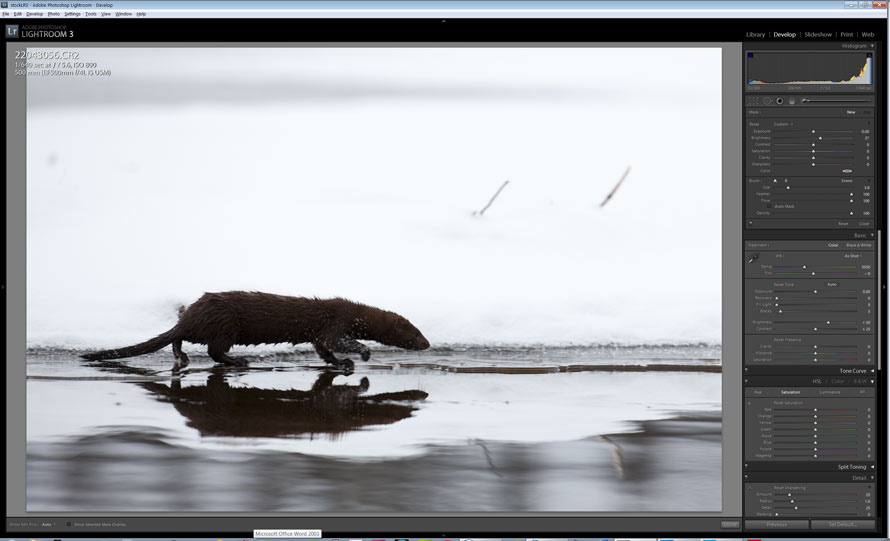
Original capture. Notice the histogram exposed as far right as possible to reflect the white brightness values of the snow
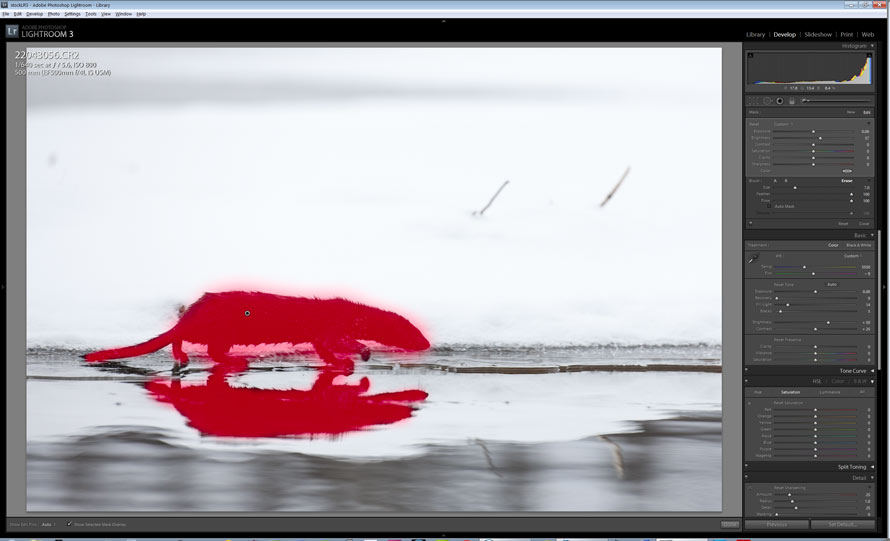
Slight brightness brush applied in LR3, along with some fill light and minus clarity
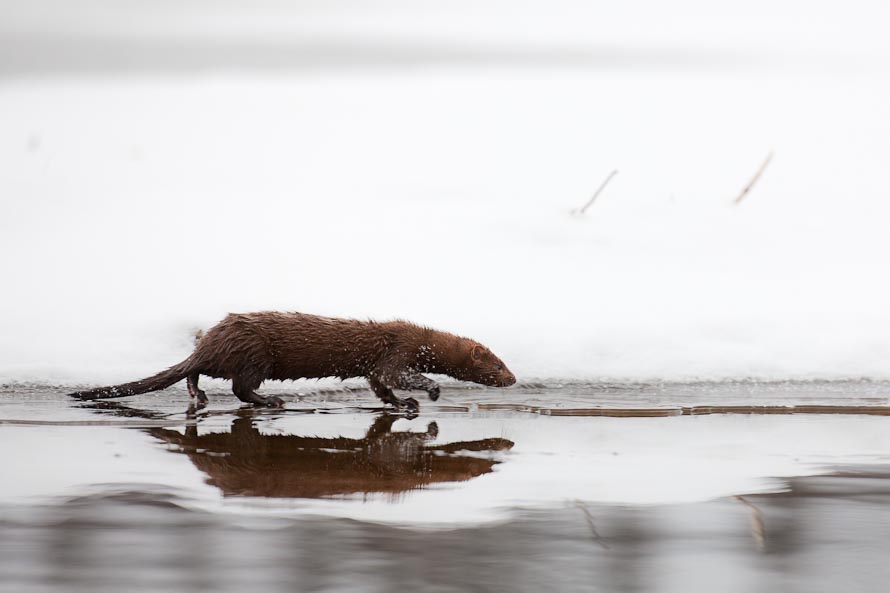
Mink hunting along stream, interior, Alaska. Canon 1ds Mark III, 500mm f4/L IS, 1/640 sec @ f/5.6, ISO 800


Nice shot Patrick (particularly hand-holding the 500). Process question: As you expose to the right for this image, perhaps even beyond what the white snow exposure requires, will you go a little beyond the histogram (i.e., getting some flashing highlights) knowing that you can bring them back in Lightroom? RAW files generally have a degree of highlight headroom beyond what the standard jpeg histogram on a camera displays. For example, I know I can recover at least a stop or so of “overexposure” with my A900 files, and thus will sometimes push the histogram even a bit further to the right, where I have some flashing highlights. Obviously, the extent to which this works will depend on the particular camera, how much dynamic range (headroom) it has, and how it displays the jpeg based histogram (or how one has set the camera for such purposes – such as the Uni WB concept).
Anyway, looks like you and Hugh had a couple of great trips. Something I need to keep in mind for next year. 🙂
Mark,
I do occasionally exceed the histogram threshold when exposing-to-the-right (when deep shadows are present). And I concur that it is possible to recover some of the highlight warning/slight overexposure from the RAW file. However, all cameras are different in this way, in terms of what tolerance the highlight warning holds. And sometimes, even though there is no blinking warning, severe bright highlights merit some underexposure or they can look really weird during post production recovery. But, in general, one can get away with slight overexposure. In this specific case, I chose not to do that in order to stay with a shutter speed of 1/640.
Thanks Patrick. I agree with your comments. I’m just glad that my current cameras do provide a good deal of highlight recovery ability as it provides a bit of added flexibility for situations such as this one. But, I certainly understand the desire to maintain the faster shutter speed. Your photo reminded me of an otter/coyote encounter I witnessed many years ago in Yellowstone on a winter trip. Given that I was shooting film at the time I didn’t have nearly the flexibility I would have today shooting the same situation. Imagine trying to photograph that mink on slide film. 🙂
Sounds like an awesome encounter, and really cool image — it portrays the fast-paced motion of the mink really well. And gotta love that reflection too. The adjustment brush in Lightroom is such a powerful tool for a situation like this, its surprisingly easy to tweak the exposure of a subject under harsh lighting conditions.
Pat,
Local adjustments in LR are part of the “way” these days in post production work. It’s pretty amazing and really expands the dynamic range capability when compared to film. I’ve never watched a mink in the wild for any length of time before, and this guy moved pretty quickly most of the time.