

As I’m immersed in the rather daunting task of culling, re-editing, re-processing, dust-stamping, keyword fixing–and on and on–of my entire Alaska archives of 40,000 image files, two 30 inch monitors come in handy. Mouse click reduction is one end goal, and screen real estate can limit those clicks especially in the specific task of scanning an image for dust. In LR3 I select the “fit” view mode in the navigator and I then only need to scroll down a few times for each 21MP file. I’ve been using LR for a long time, but keep learning more about ways to use it efficiently as a work-flow tool–besides the obvious use of grading images to look nice. The picture below shows what I’m doing these winter days in the office. With frequent breaks including an afternoon ski through the boreal forest, this monstrous task is slowly being accomplished. This specific photo of red salmon in a stream in interior Alaska is being worked on in preparation for output as a 10 x 3.5 ft canvas wrap print to be hung in the new Fairbanks International Airport.
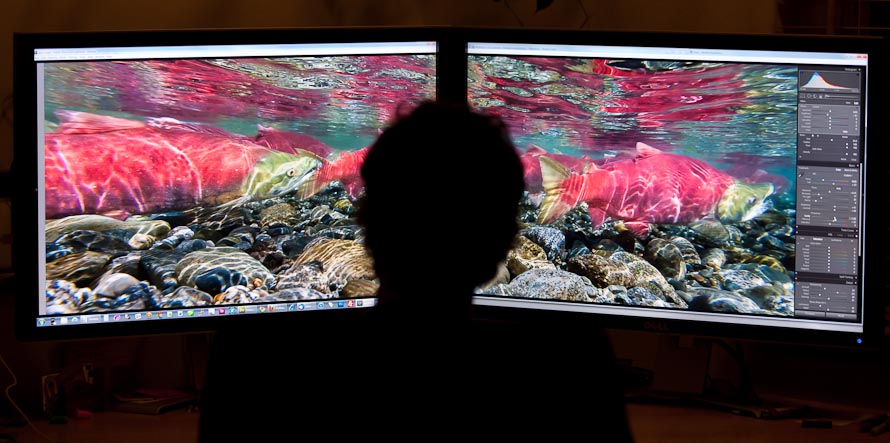
Dual 30 inch Dell monitors reduce mouse clicks and drags considerably.



I often wonder what it must be like to be you in terms of time spent in front of a computer. Do your eyes ever cross? Your mouse hand cramp? You feel like running outside and diving into the snow? Glad you take a break now and then for some skiing!
And by the way…what sort of gear do you use for your underwater work?
More daylight every day now. Spring isn’t too far off. Go outside.
Jim
You’ve just convinced me to buy a matching 24″ LED to go with my primary one now. I’m currently only using an old 17″ CRT for other random tasks, but in seeing this I can only imagine how much more productive I’d be!
Thanks!
Jim, You are so right, the light is coming back, hurry hurry with this project so I can go outside!
Mike, Workflow and efficiency is critical, the efficiency gained becomes an economic no-brainer and there is no going back.
Very Nice set up Patrick.
Hi Patrick….First of all thank you for the beautiful images that you share on your blog! I have a file for all of your blog postings, and as long as your web links remain viable, I can revisit your photos anytime I wish, and I do so!
I have a group of 20,000 + images I shot in Antarctica last year and I am wresting with the same problem that you described. I have twin, 30 inch monitors as well, and Lightroom 3, but I have not really gotten into working with the task yet….procrastination!
I would love to pick your brain for a bit to hear you talk about work flow, file management, and backups! If you are willing flash me back and I will try to contact you again. Thanks…
Bob,
I am working on a future post that will describe in further detail, how I approach the whole subject of workflow. It in many ways depends on what is to be done with the images in the end, but there will be lots of general information that you may find helpful. At least I’ll feel better about sharing something I’ve learned from a task that at times seems both time-saving and time-wasting!
What a cool setup! Another point in my favor for a second monitor.
Seeing you sitting in front of those dual monitors – ENVY is the first word that comes to mind! Living in a caravan and barely having room on the table for my 17″ laptop – on my side of the table 🙂 – certainly results in a different processing world.
Nevertheless, your galleries, blog, and general information are a constant source of inspiration since we met in Antarctica.
Thanks, Jay
Yes Jay,
But you enjoy the minimalist life!
Hi Patrick- Thanks for the great information and art on your site.
I am thinking about buying a 30″ monitor for photo processing. I notice you have Dell monitors. Do you have any tips on choosing between the Dell U3011 and the NEC 3090?
Thanks!